2020年12月30日 星期三

[Docker]Tensorflow-serving

# CPU
# Download the TensorFlow Serving Docker image and repo
docker pull tensorflow/serving:latest-gpu
# GPU
# 建立tf資料夾
mkdir -p $(pwd)/tf
TESTDATA="$(pwd)/tf"

### CPU ###
docker run -t --rm -p 8501:8501 \
    --name tf_serving \
    -v "$TESTDATA:/models/fashion_model" \
    -e MODEL_NAME=fashion_model \
    tensorflow/serving &

### GPU ###	
docker run -t --runtime=nvidia -p 8501:8501 \
    --name tf_serving_gpu \
	-v "$TESTDATA:/models/fashion_model" \
	-e MODEL_NAME=fashion_model \
	tensorflow/serving:latest-gpu &
# Query the model using the predict API
curl -d '{"instances": [1.0, 2.0, 5.0]}' \
    -X POST http://localhost:8501/v1/models/half_plus_two:predict
import tensorflow as tf
from tensorflow import keras

# Helper libraries
import numpy as np
import matplotlib.pyplot as plt
import json

import requests

fashion_mnist = keras.datasets.fashion_mnist
(_, _), (test_images, test_labels) = fashion_mnist.load_data()

test_images = test_images.reshape(test_images.shape[0], 28, 28, 1)

data = json.dumps({"signature_name": "serving_default", "instances": test_images[0:3].tolist()})

headers = {"content-type": "application/json"}
json_response = requests.post('http://10.15.11.75:8501/v1/models/fashion_model:predict', data=data, headers=headers)
print(json_response)

predictions = json.loads(json_response.text)['predictions']
print(np.argmax(predictions[0]))

2020年11月22日 星期日

[Python]Dataframe GruopBy sum

In [19]:
import pandas as pd
In [20]:
df = pd.read_csv('weather_by_cities.csv')
Out[20]:
day city temperature windspeed event
0 1/1/2017 new york 32 6 Rain
1 1/2/2017 new york 36 7 Sunny
2 1/3/2017 new york 28 12 Snow
3 1/4/2017 new york 33 7 Sunny
4 1/1/2017 mumbai 90 5 Sunny
5 1/2/2017 mumbai 85 12 Fog
6 1/3/2017 mumbai 87 15 Fog
7 1/4/2017 mumbai 92 5 Rain
8 1/1/2017 paris 45 20 Sunny
9 1/2/2017 paris 50 13 Cloudy
10 1/3/2017 paris 54 8 Cloudy
11 1/4/2017 paris 42 10 Cloudy
In [55]:
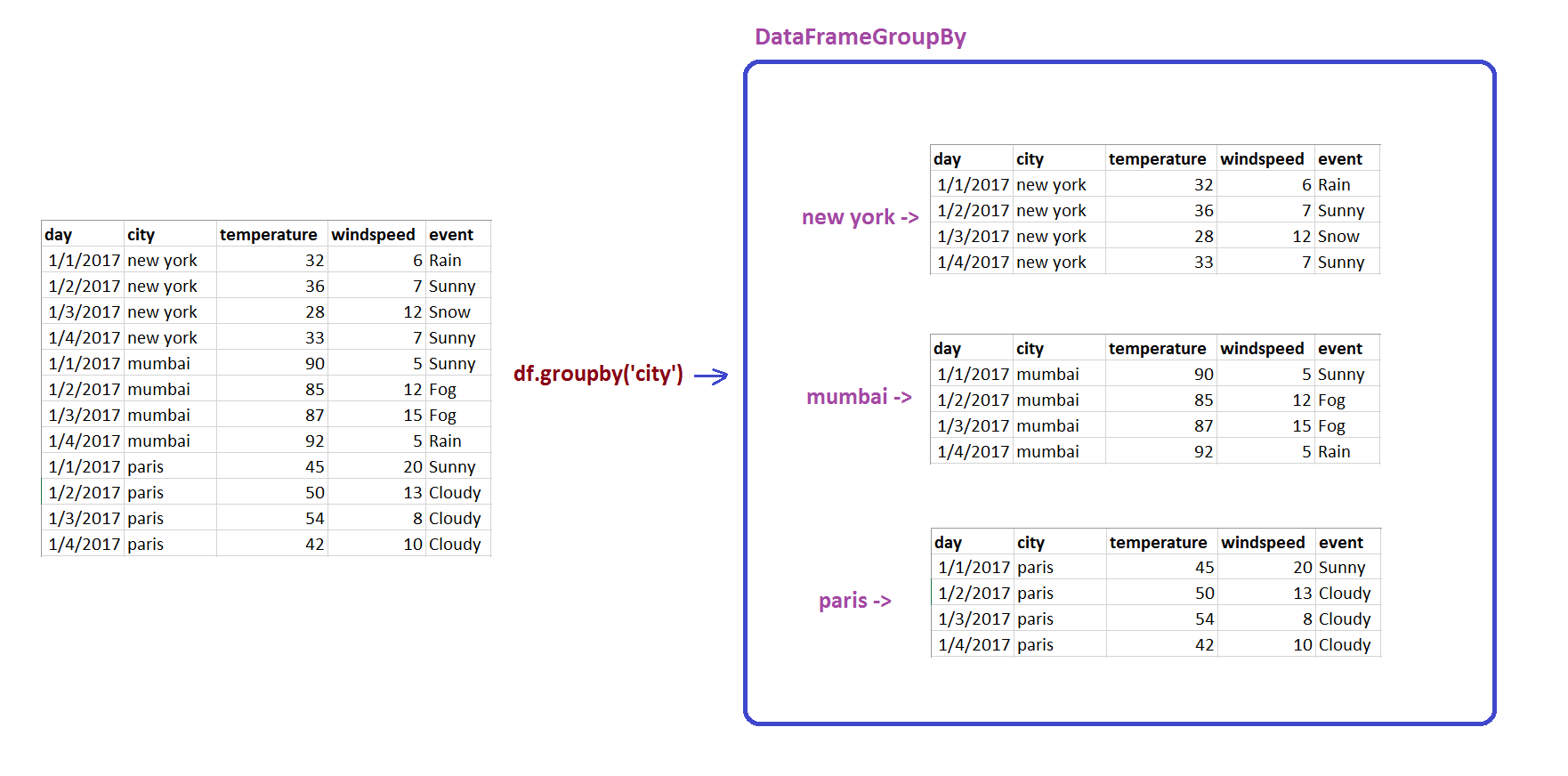
g = df.groupby('city')
g
Out[55]:
<pandas.core.groupby.generic.DataFrameGroupBy object at 0x00000200CAE08588>

Group BY

Group BY

In [56]:
for city, city_df in g:
    print(city)
    print(city_df)
mumbai
        day    city  temperature  windspeed  event
4  1/1/2017  mumbai           90          5  Sunny
5  1/2/2017  mumbai           85         12    Fog
6  1/3/2017  mumbai           87         15    Fog
7  1/4/2017  mumbai           92          5   Rain
new york
        day      city  temperature  windspeed  event
0  1/1/2017  new york           32          6   Rain
1  1/2/2017  new york           36          7  Sunny
2  1/3/2017  new york           28         12   Snow
3  1/4/2017  new york           33          7  Sunny
paris
         day   city  temperature  windspeed   event
8   1/1/2017  paris           45         20   Sunny
9   1/2/2017  paris           50         13  Cloudy
10  1/3/2017  paris           54          8  Cloudy
11  1/4/2017  paris           42         10  Cloudy
In [48]:
g = df.groupby('city').sum()
Out[48]:
temperature windspeed
city
mumbai 354 37
new york 129 32
paris 191 51
In [23]:
# SELECT * from city_data GROUP BY city
g.get_group('mumbai')
Out[23]:
day city temperature windspeed event
4 1/1/2017 mumbai 90 5 Sunny
5 1/2/2017 mumbai 85 12 Fog
6 1/3/2017 mumbai 87 15 Fog
7 1/4/2017 mumbai 92 5 Rain
In [33]:
g.max()
Out[33]:
day temperature windspeed event
city
mumbai 1/4/2017 92 15 Sunny
new york 1/4/2017 36 12 Sunny
paris 1/4/2017 54 20 Sunny
In [35]:
g.mean()
Out[35]:
temperature windspeed
city
mumbai 88.50 9.25
new york 32.25 8.00
paris 47.75 12.75
In [38]:
g.describe()
Out[38]:
temperature windspeed
count mean std min 25% 50% 75% max count mean std min 25% 50% 75% max
city
mumbai 4.0 88.50 3.109126 85.0 86.50 88.5 90.50 92.0 4.0 9.25 5.057997 5.0 5.00 8.5 12.75 15.0
new york 4.0 32.25 3.304038 28.0 31.00 32.5 33.75 36.0 4.0 8.00 2.708013 6.0 6.75 7.0 8.25 12.0
paris 4.0 47.75 5.315073 42.0 44.25 47.5 51.00 54.0 4.0 12.75 5.251984 8.0 9.50 11.5 14.75 20.0

[Python]Datafram merge (inner join, outer join, left, right)

Pandas Merge Tutorial

Basic Merge Using a Dataframe Column

In [28]:
import pandas as pd
df1 = pd.DataFrame({
    "city": ["new york","chicago","orlando"],
    "temperature": [21,14,35],
})
df1
Out[28]:
city temperature
0 new york 21
1 chicago 14
2 orlando 35
In [29]:
df2 = pd.DataFrame({
    "city": ["chicago","new york","orlando"],
    "humidity": [65,68,75],
})
df2
Out[29]:
city humidity
0 chicago 65
1 new york 68
2 orlando 75
In [30]:
df3 = pd.merge(df1, df2, on="city")
df3
Out[30]:
city temperature humidity
0 new york 21 68
1 chicago 14 65
2 orlando 35 75

Type Of DataBase Joins

<img src="db_joins.jpg" height="800", width="800">

In [31]:
df1 = pd.DataFrame({
    "city": ["new york","chicago","orlando", "baltimore"],
    "temperature": [21,14,35, 38],
})
df1
Out[31]:
city temperature
0 new york 21
1 chicago 14
2 orlando 35
3 baltimore 38
In [32]:
df2 = pd.DataFrame({
    "city": ["chicago","new york","san diego"],
    "humidity": [65,68,71],
})
df2
Out[32]:
city humidity
0 chicago 65
1 new york 68
2 san diego 71
In [33]:
df3=pd.merge(df1,df2,on="city",how="inner")
df3
Out[33]:
city temperature humidity
0 new york 21 68
1 chicago 14 65
In [34]:
df3=pd.merge(df1,df2,on="city",how="outer")
df3
Out[34]:
city temperature humidity
0 new york 21.0 68.0
1 chicago 14.0 65.0
2 orlando 35.0 NaN
3 baltimore 38.0 NaN
4 san diego NaN 71.0
In [35]:
df3=pd.merge(df1,df2,on="city",how="left")
df3
Out[35]:
city temperature humidity
0 new york 21 68.0
1 chicago 14 65.0
2 orlando 35 NaN
3 baltimore 38 NaN
In [36]:
df3=pd.merge(df1,df2,on="city",how="right")
df3
Out[36]:
city temperature humidity
0 new york 21.0 68
1 chicago 14.0 65
2 san diego NaN 71

indicator flag

In [37]:
df3=pd.merge(df1,df2,on="city",how="outer",indicator=True)
df3
Out[37]:
city temperature humidity _merge
0 new york 21.0 68.0 both
1 chicago 14.0 65.0 both
2 orlando 35.0 NaN left_only
3 baltimore 38.0 NaN left_only
4 san diego NaN 71.0 right_only

suffixes

In [38]:
df1 = pd.DataFrame({
    "city": ["new york","chicago","orlando", "baltimore"],
    "temperature": [21,14,35,38],
    "humidity": [65,68,71, 75]
})
df1
Out[38]:
city humidity temperature
0 new york 65 21
1 chicago 68 14
2 orlando 71 35
3 baltimore 75 38
In [39]:
df2 = pd.DataFrame({
    "city": ["chicago","new york","san diego"],
    "temperature": [21,14,35],
    "humidity": [65,68,71]
})
df2
Out[39]:
city humidity temperature
0 chicago 65 21
1 new york 68 14
2 san diego 71 35
In [40]:
df3= pd.merge(df1,df2,on="city",how="outer", suffixes=('_first','_second'))
df3
Out[40]:
city humidity_first temperature_first humidity_second temperature_second
0 new york 65.0 21.0 68.0 14.0
1 chicago 68.0 14.0 65.0 21.0
2 orlando 71.0 35.0 NaN NaN
3 baltimore 75.0 38.0 NaN NaN
4 san diego NaN NaN 71.0 35.0

join

In [58]:
df1 = pd.DataFrame({
    "city": ["new york","chicago","orlando"],
    "temperature": [21,14,35],
})
df1.set_index('city',inplace=True)
df1
Out[58]:
temperature
city
new york 21
chicago 14
orlando 35
In [59]:
df2 = pd.DataFrame({
    "city": ["chicago","new york","orlando"],
    "humidity": [65,68,75],
})
df2.set_index('city',inplace=True)
df2
Out[59]:
humidity
city
chicago 65
new york 68
orlando 75
In [60]:
df1.join(df2,lsuffix='_l', rsuffix='_r')
Out[60]:
temperature humidity
city
new york 21 68
chicago 14 65
orlando 35 75

2020年11月5日 星期四

python-dotenv

安裝python-dotenv套件
$ pip install python-dotenv

.env檔 內容↓↓↓
IP=10.15.10.47
PORT=8080
USER_NAME="ADMIN"
PASSWORD=P@ssw0rd


test_ditenv.py
import os
from dotenv import load_dotenv
load_dotenv()
IP = os.getenv('IP')
PORT = os.getenv('PORT')
USER_NAME = os.getenv('USER_NAME')
PASSWORD = os.getenv('PASSWORD')

print(f'IP => {IP}   ', type(IP))
print(f'PORT => {PORT}   ', type(PORT))
print(f'USER_NAME => {USER_NAME}   ', type(USER_NAME))
print(f'PASSWORD => {PASSWORD}   ', type(PASSWORD))
IP => 10.15.10.47 <class 'str'>
PORT => 8080 <class 'str'>
USER_NAME => ADMIN <class 'str'>
PASSWORD => P@ssw0rd <class 'str'>

2020年10月22日 星期四

[Docker]不用sudo直接執行docker

Linux使用docker時,需要使用root或是sudo 
作業系統:CentOS 7

⊙ 重啟電腦自動啟動docker
infrada@localhost ~ $ sudo systemctl enable docker.service
1. 建立docker群組
sudo groupadd docker
2. 將使用者加入docker群組中
#user:使用者名稱
sudo usermod -G docker -a #user
加入群組後,若使用者為登入狀態,不會馬上生效
infrada@localhost ~$ groups
wheel infrada
3. 立即生效加入群組中
infrada@localhost ~ $ newgrp docker
infrada@localhost ~ $ groups
docker wheel infrada
4. 重新啟動docker
sudo systemctl restart docker

2020年5月29日 星期五

[Python]Colab讀入載入Google Drive方法

此種方法是最簡單的方法,不需要每次都上傳一次檔案,可以重複使用


# -*- coding: utf-8 -*-
from google.colab import drive
drive.mount('/content/drive')

點擊 URL > 選擇帳戶 > 允許

將驗證碼貼回Coloab內按下Enter送出。
接下來會看到Google Drive的資料夾在左邊那邊長了出來,就可以開始對目錄操作


path = './content/drive/My Drive/
# 後面路徑自己接,就可以直接使用了

2020年4月12日 星期日

Pandas One hot encoding

import pandas as pd
df = pd.DataFrame([
   ['green', 'M', 10.1],
   ['red', 'L', 13.5],
   ['blue', 'XL', 15.3]])
  
df.columns = ['color', 'size', 'prize']
df

[out:]
colorsizeprize
0greenM10.1
1redL13.5
2blueXL15.3
pd.get_dummies(df)
prizecolor_bluecolor_greencolor_redsize_Lsize_Msize_XL
010.1010010
113.5001100
215.3100001

2020年1月12日 星期日

[python]doc2vec教學 step-by-step

|-doc2vec_Chinese //新建文件夹
    |- doc2vec.py //新建python
    |- data 
        |- rawdata.txt 
    |- model 

資料集來源:https://github.com/draguitar/doc2vec_Chinese/blob/master/data/rawdata.txt
import 模組
設定停止詞

# %%
import os
 # 專案路徑
os.chdir("D:/python/doc2vec")

import jieba
import sys
import gensim
import sklearn
import numpy as np
from gensim.models.doc2vec import Doc2Vec, LabeledSentence #從gensim導入doc2vec
TaggededDocument = gensim.models.doc2vec.TaggedDocument
#手動將'瓔珞'加入自定義userdict.txt中
jieba.load_userdict("./jieba/userdict.txt")

# 停止詞
stoplist = ['的','了','被','。',',','、','她','自己','他','並','和','都','去','\n']
# %%
中文結巴斷詞
# %%
#中文分詞
def  cut_files():
    filePath = 'data/rawdata.txt'
    fr = open(filePath, 'r', encoding="utf-8")
    fvideo = open('data/rawdata_jieba.txt', "w", encoding="utf-8")

    for line in fr.readlines():
        curLine =' '.join(list(jieba.cut(line)))
        fvideo.writelines(curLine)
# %%
將文本轉成>>>TaggedDocument,
# %%
def get_datasest():
    with open("data/rawdata_jieba.txt", 'r', encoding="utf-8") as cf:
        docs = cf.readlines()
        
        # 删除stopword
        for idx in list(range(0,len(docs))):
            docs[idx] = ' '.join([word for word in docs[idx].split( ) if word not in stoplist])
        docs = [doc for doc in docs if len(doc)>0]
        print(len(docs))

    x_train = []
    for i, text in enumerate(docs):
        word_list = text.split(' ')
        l = len(word_list)
        word_list[l - 1] = word_list[l - 1].strip()
        document = TaggededDocument(word_list, tags=[i])
        x_train.append(document)

    return x_train
# %%
# %%
#訓練模型
def train(x_train, size=200, epoch_num=1):  # size=200 200維
 # 使用 Doc2Vec 建模
    model_dm = Doc2Vec(x_train, min_count=1, window=3, size=size, sample=1e-3, negative=5, workers=4)
    #model_dm.train(x_train, total_examples=model_dm.corpus_count, epochs=70)
    model_dm.save('model/model_dm_doc2vec')

    return model_dm
# %%
# %%
def test():
#    model_dm = Doc2Vec.load("model/model_dm_doc2vec")
    test_text = ['我', '喜歡', '傅恆']
    inferred_vector_dm = model_dm.infer_vector(test_text)
    
    # 相似度前10
    sims = model_dm.docvecs.most_similar([inferred_vector_dm], topn=10)
    return sims
# %%
# %%
if __name__ == '__main__':
    cut_files()
    x_train=get_datasest()
    model_dm = train(x_train)
    sims = test()
    for count, sim in sims:
        sentence = x_train[count]
        words = ''
        for word in sentence[0]:
            words = words + word + ' '
        print (words, sim, len(sentence[0]))
# %%  
        # 相似度
        print(model_dm.similarity('瓔珞', '皇后'))
        print(model_dm.similarity('瓔珞', '皇上'))
#print(model_dm.wv.vocab)
# %%
'''
官方文件的基本範例
https://radimrehurek.com/gensim/models/doc2vec.html
'''
from gensim.test.utils import common_texts
from gensim.models.doc2vec import Doc2Vec, TaggedDocument
documents = [TaggedDocument(doc, [i]) for i, doc in enumerate(common_texts)]
print(documents)
# %%

2019年7月22日 星期一

[Python]Colab讀取資料三種方法

本篇教學Colab,使用三種方法讓Colab讀取CSV檔 Colab是Google提供的免費平台,允許用戶使用Python進行編碼。 Colab本質上是Jupyter筆記本的Google Suite版本。 Colab優於Jupyter的一些優點包括更容易安裝包和共享文本。


github

點擊RAW,複製網址列網址,貼到程式碼中
url = '將網址貼到這'
df1 = pd.read_csv(url)
# Dataset is now stored in a Pandas Dataframe

上傳


from google.colab import files
# 上傳CSV
uploaded = files.upload()
import io
df2 = pd.read_csv(io.BytesIO(uploaded['你的檔案名稱.csv']))

Google Drive

import pandas as pd
# Code to read csv file into Colaboratory:
!pip install -U -q PyDrive
from pydrive.auth import GoogleAuth
from pydrive.drive import GoogleDrive
from google.colab import auth
from oauth2client.client import GoogleCredentials
# Authenticate and create the PyDrive client.
auth.authenticate_user()
gauth = GoogleAuth()
gauth.credentials = GoogleCredentials.get_application_default()
drive = GoogleDrive(gauth)
出現提示時,點擊連結進行身分認證,允許訪問你的Google Drive,許可後將驗證碼貼製colab的驗證框中; 完成驗證後,到Google Drive中的CSV文件,右鍵選擇“取得檔案共用連結”。該連結將被複製到剪貼板中。將此連結貼到Colab中的link變數中。
link = 'https://drive.google.com/open?id=1GtzgAplaOjHEgXe2Rc-_pd1Dt_Wxl4Ya' 
# The shareable link
fluff, id = link.split('=')
print (id) 
# Verify that you have everything after '='
取得Dataframe
downloaded = drive.CreateFile({'id':id}) 
downloaded.GetContentFile('Filename.csv')  
df3 = pd.read_csv('Filename.csv')
# Dataset is now stored in a Pandas Dataframe

2017年9月5日 星期二

[Python]高中生程式解題系統


#a003. 兩光法師占卜術
import sys
for line in sys.stdin:
 a,b = line.split()
 result = (int(a*2) + int(b))%3
 
 if result== 0 :
  print('普通')
 elif result== 1 :
  print('吉')
 else :
  print('大吉')
  

#a004. 文文的求婚  
import sys
for year in sys.stdin:
 if int(year)%4 == 0 and int(year)%100 != 0 :
  print('閏年')
 
 elif int(year)%400 == 0 :
  print('閏年')
  
 else :
  print('平年')
  
#a005. Eva 的回家作業
import sys
for input in sys.stdin:
 if len(input.split()) > 3 :
  a,b,c,d = input.split()
  
  if int(a)*int(d) == int(b)*int(c) :
   print('%s %s %s %s %d' % (a,b,c,d,int(d)/int(c)*int(d)))
  else :
   print('%s %s %s %s %d' % (a,b,c,d,int(d)-int(c)+int(d)))


#a009. 解碼器   
import sys

output = '' 
for input in sys.stdin:
 for char in input:
  if not char.isspace() :
   newchar = chr(int(ord(char))-7)
   output += newchar
  else :
   output += '\n'
print(output)

#a020: 身分證檢驗
import sys

output = '' 
city = [10,11,12,13,14,15,16,17,34,18,19,20,21,22,35,23,24,25,26,27,28,29,32,30,31,33]
i = 0

for input in sys.stdin:
    for char in input:
        if not char.isspace() :
            idx = ord(char)-ord('A') 
        else :
            break
        i+=1
        
        if i >0 :
            break
    newStr = str(city[idx]) + input
    newStr = newStr[:2] + newStr[3:]
    
    verify = int(newStr[0]) + int(newStr[10])
    for i in range(1,10,1):        
        verify += int(newStr[i])*int(10-i)
    
    if verify%10 == 0:
        print('real')
    else:
        print('fake')
  
#a034: 二進位制轉換
import sys
for input in sys.stdin:
 output = bin(int(input))
 output = output[2:] 
 
 print(output)

#a040: 平面圓形切割
import sys
for line in sys.stdin:
 n = int(line)
 print(n*n -n +2)
 

#a044: 空間切割
while True:
    try:
        plane  = int(input().strip('\r').strip('\n'))
        block = 2**plane
            
        
        print("{0}".format(block))
    except:
        break    
 

#a104: 排序
import sys
for sortNum in sys.stdin:
    output = ''
    output2 = ''
    if len(sortNum.split()) > 1:
        output = sorted(sortNum.split())

        i = 0
        for a in output:  
            if i==0:
                output2 += a
            else :
                output2 +=  ' ' + a
            i +=1 
        print(output2)
        
while 1:
    try:
        input()
        list1 = input().strip('\r').split(' ')
        list2 = [int(x) for x in list1]
        list2.sort()
        for y in list2:
            print(y,end=' ')
        print()
    except EOFError:
        break

    
#a147: Print it all   
import sys
for lim in sys.stdin:
    output = ''
    if int(lim) > 0:
        i = 0
        for a in range(1,int(lim),1):  
            if i==0:
                output += str(a) 
            elif a%7 != 0:
                output +=  ' ' + str(a)  
            i +=1 
        print(output)
        
#a149: 乘乘樂
while True:
    try:
        size = int(input().strip('\r').strip('\n'))
        for item in range(0, size , 1):
            numStr = input()
            list2 = [int(x) for x in numStr]
            num = 1
            for y in list2:
                num *= y
            print(num)
        
        #print("hello, {0}".format(line))
    except:
        break    
        
#a038: 數字翻轉       
while True:
    try:
        list1 = input().strip('\r').strip('\n')
        list2 = [int(x) for x in list1]
        list2.reverse()
        x = ''
        for y in list2:
            x += str(y)
        
        print(int(x))
    except EOFError:
        break


#a022: 迴文
while True:
    try:
        x=input().strip('\r').strip('\n')
        list1 = list(x)
        list1.reverse()
        if list(x)==list1:
            print('yes')
        else:
            print('no')
    except EOFError:
        break
        
#a148: You Cannot Pass?!
while True:
    try:
        score=input().strip('\r').strip('\n').split(' ')
        i = 0
        item = 0
        sumScore = 0
        for x in score:
            if i==0:
                item = int(x)
            else:
                sumScore += int(x)
            i+=1
         
        if sumScore/item>59:
            result = 'no'    
        else:
            result = 'yes'
        print(result)
    except EOFError:
        break   
        
#a738: 最大公约数
def is_number(s):
    try:
        float(s)
        return True
    except ValueError:
        pass
 
    try:
        import unicodedata
        unicodedata.numeric(s)
        return True
    except (TypeError, ValueError):
        pass
 
    return False

while True:
    try:
        list1 = input().strip('\r').split(' ')
        if len(list1) > 1 and is_number(list1[0].strip()) and is_number(list1[1].strip()):
            list2 = [int(x) for x in list1]
            list2.sort()
            
            a = int(list2[0])
            if a!=0 :
                b = int(list2[1])
                
                while b != 0:
                    t = a % b;
                    a = b
                    b = t
                print(a)
    except EOFError:
        break  
        
        
#a799: 正值國

while True:
    output = 0
    try:
        x = input().strip('\r')
        if int(x) < 0:
            output = -int(x)
        else:
            output = int(x)
        print(output)
    except EOFError:
        break    

#a065: 提款卡密碼
while True:
    output = ''
    try:
        x = input().strip('\r')
        x2 = list(x)
        
        y = [ord(x3) for x3 in x2]
        for i in range(0, len(y)-1):
            output += str(abs(y[i+1]-y[i]))
        print(output)
    except EOFError:
        break       

#d050: 妳那裡現在幾點了?        
while True:
    try:
        x = int(input().strip('\r'))
        if x>=15:
            print(x-15)
        else:
            print(x+24-15)
    except EOFError:
        break     

#d051: 糟糕,我發燒了!
while True:
    try:
        f = int(input().strip('\r'))
        c = (f-32)*5/9
        c = "%.3f" % c
        print(c)
    except EOFError:
        break     
        
#d058: BASIC 的 SGN 函數
while True:
    try:
        x = int(input().strip('\r'))
        if x > 0:
            print(1)
        elif x == 0:
            print(0)
        else:
            print(-1)
    except EOFError:
        break     

#d060: 還要等多久啊?    
while True:
    try:
        x = int(input().strip('\r'))
        if 25 >= x:
            print(25-x)
        else:
            print(25+60-x)
    except EOFError:
        break       


#d063: 0 與 1        
while True:
    try:
        x = int(input().strip('\r'))
        print(int(x==0))
    except EOFError:
        break  
        
#d064: 奇數?
while True:
    try:
        x = int(input().strip('\r'))
        if x%2==0:
            print('Even')
        else:
            print('Odd')
    except EOFError:
        break  
        
#d065: 三人行必有我師        
while True:
    try:
        list1 = input().strip('\r').split(' ')
        list2 = [int(x) for x in list1]
        print(max(list2))
    except EOFError:
        break  

#d066: 上學去吧!
from datetime import datetime as dt
while True:
    try:
        x = input().strip('\r')
        test = dt.strptime(x, "%H %M")
        s = dt.strptime("07 30", "%H %M")
        e = dt.strptime("17 00", "%H %M")
        if s <= test and test < e:
            print('At School')
        else:
            print('Off School')
    except EOFError:
        break    
        
#d068: 該減肥了!
while True:
    try:
        x = int(input())
        w = 0 
        if x > 50:
            w = int(x)-1
        else:
            w = x
        print(w)
    except EOFError:
        break  

#d074: 電腦教室
while True:
    try:
        x = input().strip('\r')
        list1 = input().strip('\r').split(' ')
        list2 = [int(x) for x in list1]
        print(max(list2))
    except EOFError:
        break  
        

#a263: 日期差幾天  
import datetime      
while True:
    try:
        list_day1 = input().strip('\r').split(' ')
        day1 = datetime.date(int(list_day1[0]),int(list_day1[1]),int(list_day1[2]))
        #設定要相減的日期
        list_day2 = input().strip('\r').split(' ')
        day2 = datetime.date(int(list_day2[0]),int(list_day2[1]),int(list_day2[2]))
        result = abs(day1 - day2)
        
        print (str(result.days))
    except EOFError:
        break  
        
#d124: 3的倍数
while True:
    try:
        i = input()
        if int(i) % 3 == 0:
            print('yes')
        else:
            print('no')
    except EOFError:
        break  

#d069: 文文的求婚--續集 (n 行版)
while True:
    try:
        num = int(input())
        for i in range(0,num,1):
            year = input().strip('\r')
            if int(year)%4 == 0 and int(year)%100 != 0 :
                print('a leap year')
            elif int(year)%400 == 0 :
                print('a leap year')
            else:
                print('a normal year')
    except EOFError:
        break  

#d070: 文文的求婚--續集 (0 尾版)
while True:
    try:
        year = int(input().strip('\r'))
        if year != 0:
            if int(year)%4 == 0 and int(year)%100 != 0 :
                print('a leap year')
            elif int(year)%400 == 0 :
                print('a leap year')
            else:
                print('a normal year')
        else:
            break
    except EOFError:
        break        
        
#d071: 文文的求婚--續集 (EOF 版)
while True:
    try:
        year = int(input().strip('\r'))
        if int(year)%4 == 0 and int(year)%100 != 0 :
            print('a leap year')
        elif int(year)%400 == 0 :
            print('a leap year')
        else:
            print('a normal year')
    except EOFError:
        break    

#d072: 文文的求婚--續集 (Case 版)
while True:
    try:
        num = int(input())
        for i in range(1,num+1,1):
            year = input().strip('\r')
            if int(year)%4 == 0 and int(year)%100 != 0 :
                print('Case '+i+': a leap year')
            elif int(year)%400 == 0 :
                print('Case '+i+': a leap year')
            else:
                print('Case '+i+': a normal year')
    except EOFError:
        break             
        
#d073: 分組報告
while True:
    try:
        team = 0
        num = int(input())
        if num % 3 == 0:
            team = int(num/3)
        else:
            team=int(num/3)+1
        print(team)
    except EOFError:
        break  
        
#d086: 態度之重要的證明
while True:
    try:
        inputStr = input().strip('\r').strip().lower()
        if inputStr != '0':
            inputList = list(inputStr)
            output = 0
            output2 = ''
            for score in inputList:
                if ord(score)-96<=26 and ord(score)-96>=1:
                    output += ord(score)-96
                else:
                    output2 = 'Fail'
                    
            if output2.strip()!='':
                print(output2)
            else:
                print(output)
    except EOFError:
        break 
        
#d827: 買鉛筆
while True:
    try:
        inputStr = input().strip('\r').strip()
        all = int(inputStr)
        output = divmod(all, 12)
        print(output[0] * 50 + output[1] * 5)
    except EOFError:
        break 
        

#d483: hello, world  
while True:
    try:
        inputStr = input().strip('\r').strip()
        print(hello, world)
    except EOFError:
        break   
        
#a058: MOD3
while True:
    try:
        b = 0
        c = 0
        d = 0
        inputSize = int(input().strip('\r'))
        for i in range(0,inputSize,1):    
            a=int(input().strip('\r'))
            if a%3==0:
                b += 1
            elif a%3==1:
                c += 1
            else:
                d += 1
        print('%d %d %d' % (b, c, d))
    except EOFError:
        break  
        
#a053: Sagit's 計分程式
while True:
    try:
        score = 0
        inputSrt = int(input().strip('\r'))
        if inputSrt >= 0 and inputSrt <= 10:
            score = 6 * inputSrt
        elif inputSrt>10 and inputSrt<=20:
            score= 60 + 2*(inputSrt-10)
        elif inputSrt>20 and inputSrt<=39:
            score= 80 + 1*(inputSrt-20)
        else:
            score= 100
        print(score)
    except EOFError:
        break      
        
#d460: 山六九之旅
while True:
    try:
        year = int(input().strip('\r'))
        cost = 0
        if year < 6:
            cost = 0
        elif year>=6 and year<12: cost="590" elif="" year="">=12 and year<18: cost="790" elif="" year="">=18 and year<60: break="" cost="" else:="" eoferror:="" except="" pre="" print="">

2016年11月9日 星期三

ASP .NET MVC 登入驗證 FormsAuthentication


[AllowAnonymous] //此Class不驗證
public class AccountController : BaseController
{
    [HttpPost]
    public ActionResult LoginGo(Login form)
    {
        Session.RemoveAll();
        Session["LoginInfo"] = null;
        LoginData loginData = new LoginData();
        try
        {
            if (ValidateLogin(form))
            {
                //驗證成功(失敗則重新登入)
                loginData.loginStatus = "00";
                loginData.userId = form.userId;
                loginData.userName = "使用者名稱";

                //表單驗證開始
                FormsAuthenticationTicket authTicket = LoginProcess(form.userId);
                //加密Ticket
                string encryptedTicket = FormsAuthentication.Encrypt(authTicket);
                //建立Cookie
                HttpCookie authCookie = new HttpCookie(FormsAuthentication.FormsCookieName, encryptedTicket);
                //將建立的Cookie寫入Cookie
                Response.Cookies.Add(authCookie);

                return RedirectToAction("Login", "Account");
            }

            else
            {
                return RedirectToAction("Login", "Account");
            }
        }
        catch (Exception ex)
        {
            return RedirectToAction("Login", "Account");
        }
    }

    private bool ValidateLogin(Login form)
    {
        //DB驗證,AD驗證寫在此 
        return true;
    }
    
    //將登入資訊寫入Ticket
    private FormsAuthenticationTicket LoginProcess(string userId)
    {
        string roles = "test";
        FormsAuthenticationTicket authTicket = 
            new FormsAuthenticationTicket(
                    1,
                    userId,
                    DateTime.Now,
                    DateTime.Now.AddMinutes(20),
                    false,
                    roles//寫入角色之後角色權限使用
                );
        return authTicket;
    }
}
所有的Controller都繼承BaseController,驗證寫在BaseController[Authorize],若Method或Class不需要驗證則加上[AllowAnonymous]
[Authorize]
public class BaseController : Controller
{
    protected static NLog.Logger _logger = NLog.LogManager.GetCurrentClassLogger();
}
Web.config 配置

2016年3月8日 星期二

JAVA junit測試 AD帳密驗證 + search AD displayName(顯示名稱)

package junit.test.AD;

import java.util.Hashtable;

import javax.naming.AuthenticationException;
import javax.naming.CommunicationException;
import javax.naming.Context;
import javax.naming.NamingEnumeration;
import javax.naming.NamingException;
import javax.naming.directory.Attributes;
import javax.naming.directory.SearchControls;
import javax.naming.directory.SearchResult;
import javax.naming.ldap.InitialLdapContext;
import javax.naming.ldap.LdapContext;

import org.junit.Test;


public class AdTest {
 @Test
 public void test() {
//  ResourceBundle res = ResourceBundle.getBundle("config");
//  String ldapURL = res.getString("Active.directory.ldapURL");
  String ldapURL = "ldap://172.23.101.108:389" ;
  System.out.println(ldapURL);
  String account = "admin";
  String password = "p@ssw0rd";
  try{
     LDAP_AUTH_AD(ldapURL, account, password);
   System.out.println("認證成功!");
  } catch (Exception e) {
   System.out.println(e.getMessage());
  }
 }
 public static void LDAP_AUTH_AD(String ldap_url, String account, String password) throws Exception {
     if (account.isEmpty() || password.isEmpty()) throw new Exception("認證失敗!");
        Hashtable env = new Hashtable();
        env.put(Context.INITIAL_CONTEXT_FACTORY, "com.sun.jndi.ldap.LdapCtxFactory");
        env.put(Context.PROVIDER_URL, ldap_url);
        env.put(Context.SECURITY_AUTHENTICATION, "simple");
        env.put(Context.SECURITY_PRINCIPAL, account+"@mizuho.com");
        env.put(Context.SECURITY_CREDENTIALS, password);

        LdapContext ctx = null;
        try {
            ctx = new InitialLdapContext(env, null);
        } catch (AuthenticationException e) {
         /**
         * error Code 說明 : 
         * 525 : 用戶沒有找到
         * 52e : 證號不正確
         * 530 : 此時間不允許登入(not permitted to logon at this time)
         * 532 : 密碼期滿
         * 533 : 帳號不可用
         * 701 : 帳戶期滿
         * 773 : 用戶必須重設密碼
         * data 後面為錯誤代碼
         */
         throw new Exception(e.getMessage() + "認證失敗!");
        } catch (CommunicationException e) {
         throw new Exception("找不到伺服器!");
        } catch (Exception e) {
         throw new Exception("發生未知的錯誤!");
        } finally {
            if (ctx != null) {
                try {
                    ctx.close();
                } catch (NamingException e) {
                }
            }
        }      
    }
 @Test
 public void testQueryAdUser() throws NamingException {
  String userId = "admin" ;
  String ldapURL = "ldap://172.23.101.108:389" ;
  String domainName = "mizuho.com";
  String account = "admin";
  String password = "p@ssw0rd";
  
  Hashtable env = new Hashtable();
        env.put(Context.INITIAL_CONTEXT_FACTORY, "com.sun.jndi.ldap.LdapCtxFactory");
        env.put(Context.PROVIDER_URL, ldapURL);
        env.put(Context.SECURITY_AUTHENTICATION, "simple");
        env.put(Context.SECURITY_PRINCIPAL, account+"@"+domainName);
        env.put(Context.SECURITY_CREDENTIALS, password);
        
        LdapContext ldapContext = new InitialLdapContext(env, null);
  
  SearchControls searchCtls = new SearchControls();
  String returnedAtts[] = { "sn", "givenName", "samAccountName","displayName" };
  
  searchCtls.setReturningAttributes(returnedAtts);
  searchCtls.setSearchScope(SearchControls.SUBTREE_SCOPE);
  String searchFilter = "(&(userPrincipalName="+userId+"@"+domainName+"))";
  String searchBase = "dc=mizuho,dc=com";
  
  // initialize counter to total the results
  int totalResults = 0;

  // Search for objects using the filter
  NamingEnumeration answer = ldapContext.search(searchBase,
    searchFilter, searchCtls);

  // Loop through the search results
  while (answer.hasMoreElements()) {
   SearchResult sr = (SearchResult) answer.next();

   totalResults++;

   System.out.println(">>>" + sr.getName());
   String displayName = sr.getName().replace("CN=", "");
   displayName = displayName.split(",")[0] ;
   System.out.println("displayName >>" + displayName);
   Attributes attrs = sr.getAttributes();
   System.out.println(">>>>>>" + attrs.get("samAccountName"));
  }
  System.out.println("Total results: " + totalResults);
  ldapContext.close();
 }
}

JQuery-MenuTree勾選

<table>
  <caption>角色 - 新增</caption>
  <tr>
    <td>
      <fieldset>
        <br />角色名稱: <input type="text" value="" name="roleName"
          id="roleName" maxlength="50" /> <br />
        <legend>權限設定</legend>
        <div id="divTree">

          <ul>
            <li class="folder"><input type="checkbox" status="all"
              class="parent_B30000" id="B30000" name="access" value="B30000">分行管理
              <ul>

                <li><input type="checkbox" class="son_B30000" id="B31000"
                  name="access" value="B31000">強制開關機設定</li>

                <li><input type="checkbox" class="son_B30000" id="B32000"
                  name="access" value="B32000">定期開關機設定</li>

                <li><input type="checkbox" class="son_B30000" id="B33000"
                  name="access" value="B33000">預約開關機設定</li>

              </ul></li>
          </ul>

          <ul>
            <li class="folder"><input type="checkbox" status="all"
              class="parent_B50000" id="B50000" name="access" value="B50000">行員帳號權限管理
              <ul>

                <li><input type="checkbox" class="son_B50000" id="B51000"
                  name="access" value="B51000">帳號管理</li>

                <li><input type="checkbox" class="son_B50000" id="B52000"
                  name="access" value="B52000">角色維護</li>

              </ul></li>
          </ul>

        </div>
      </fieldset>
    </td>
  </tr>
  <tr>
    <td>
      <button type="reset" id="btnReset">重設</button>
      <button type="button" id="btnSubmit">新增</button>
    </td>
  </tr>
</table>
<script>

$( document ).ready(function() {
  $('#btnSubmit').click(function(){
    if($('#roleName').val()==""){
      alert("請輸入角色名稱!");
      return false ;
    }
    var chk = false ;
    $('input[type=checkbox]').each(function () {
        if($(this).prop("checked")){
      chk = true ;
      }
    })
    if(!chk){
      alert("請選擇權限!");
      return false ;
    }else{
      $('#myForm').submit();
    }
  })
  
  $('input[type=checkbox]').click(function(){
    var checkClass = $(this).attr("class");
    console.info(checkClass);
    var parentClass = checkClass.replace("son","parent");
    var tmp = 'input[type=checkbox].'+checkClass ;
    allChk = false ;
    $(tmp).each(function () {
      if($(this).prop("checked")){
        allChk = true ;
      }
      if (allChk){
        var tmp2 = 'input[type=checkbox].'+parentClass
        $(tmp2).prop("checked",true);
      }
      else{
        var tmp2 = 'input[type=checkbox].'+parentClass
        $(tmp2).prop("checked",false);
      }
    })
  })
  
  
  var parentItem = $('input[status="all"]');
  $(parentItem).click(function(){
    if ($(this).prop("checked")){
      var checkClass = $(this).attr("class");
      var sonClass = checkClass.replace("parent","son");
      var tmpSon = 'input[type=checkbox].'+sonClass  ;
      $(tmpSon).prop("checked",true);
    }else{
      var checkClass = $(this).attr("class");
      var sonClass = checkClass.replace("parent","son");
      var tmpSon = 'input[type=checkbox].'+sonClass  ;
      $(tmpSon).prop("checked",false);
    }
  })
})
</script>

2015年8月12日 星期三

.NET MVC - Active Directory Login 【AD登入驗證】Windows Server 2012 R2

public ActionResult Login(string UserName, string Password, string returnUrl)
        {
            string user = UserName + domain;

            //string pathStr = string.Format("LDAP://{0}{1}{2}", ip, port, baseDN);

            try
            {
                DirectoryEntry de = new DirectoryEntry("LDAP://192.168.64.128:389/OU=MyMemberServers,DC=eSecure,DC=com", user, Password);
                Guid guid = de.Guid;
                //DirectorySearcher ds = new DirectorySearcher(de);
                de.Dispose();
                return View("ChangePassword");
            }
            catch (Exception)
            {
                
                PrincipalContext ctx = new PrincipalContext(ContextType.Domain, ip, inputBaseDN, admUser+domain, admPwd);

                UserPrincipal userObj = UserPrincipal.FindByIdentity(ctx, IdentityType.SamAccountName, UserName);


                if (userObj != null)
                {
                    //帳號停用,userObj.Enabled可能為null true false
                    bool? isEnable = userObj.Enabled;
                    //isEnable = null;
                    if (!isEnable.HasValue)
                    {
                        ViewBag.Message = "系統發生錯誤,請聯絡系統管理員";
                    }
                    else if ((bool)!isEnable)
                    {
                        ViewBag.Message = "帳號已停用,請聯絡系統管理員";
                    }
                    else
                    {
                        bool isLockedOut = userObj.IsAccountLockedOut();
                        if (isLockedOut)
                        {
                            ViewBag.Message = "帳號已被鎖定,請聯絡系統管理員";
                        }
                        else
                        {
                            Int32 badLogonCount = userObj.BadLogonCount;
                            ViewBag.Message = "密碼錯誤" + badLogonCount + "次,錯誤3次帳號即被鎖定";
                        }
                    }
                    return View("Login");
                }
                ctx.Dispose();

                ViewBag.Message = "查無此帳號";
                return View("Login");
            }
        }

2015年7月30日 星期四

2015年7月15日 星期三

photoshop CS 6 Portable 疑難雜症

1.無法將圖片直接拖曳到ps編輯畫面內:


    開始 輸入 regedit HKEY_LOCAL_MACHINE > SOFTWARE > Microsoft > Windows > CurrentVersion > Policies > System 找到EnableLUA 將1改成0,然後重啟電腦

2.變更語系: 中文 > 英文 


    ~\Adobe\Adobe Photoshop CS5\Locales\zh_TW\Support Files 找到tw10428.dat的檔案後,把它砍掉

2013年11月24日 星期日

outlook exchange 數位憑證 for mac 設定


  1. spotlite【尋找】輸入 
  2. 鑰匙圈存取  
  3. 選取你匯入的憑證點擊右鍵
  4. 新增憑證偏好設定
  5. 輸入e-mail 完工


2012年12月20日 星期四

jQuery fade in Lazyload


<script src="http://ajax.googleapis.com/ajax/libs/jquery/1.3.2/jquery.min.js" type="text/javascript"></script>

<script src="http://download.steachs.com/lazyload.mini.js" type="text/javascript"></script>


把上述兩行加到<head>與<html>之間,自動加載,產生fade in效果。
適用於google Blogger


 example: http://doctorwoodwood.blogspot.tw/


2012年9月6日 星期四

【ios推薦】FB Camera

Facebook Camera

這個APP UI很棒,在FB內圖片SHOW給你看,
分享及瀏覽朋友的照片更方便。


APP截圖